A service for sellers of digital goods

Sales on FunPay, GGSel and Plati in one panel

The panel takes an order, delivers the goods from your own stock, answers the buyer and counts what you earned. It runs on a Windows computer or on a server.

Better than any words:see for yourself what you are buying

panel.your-shop.com
The real panel on demo data. Click around or open a section:
Marketplaces FunPay GGSel Plati

01Marketplaces

Every marketplace has its own rules. The panel knows them

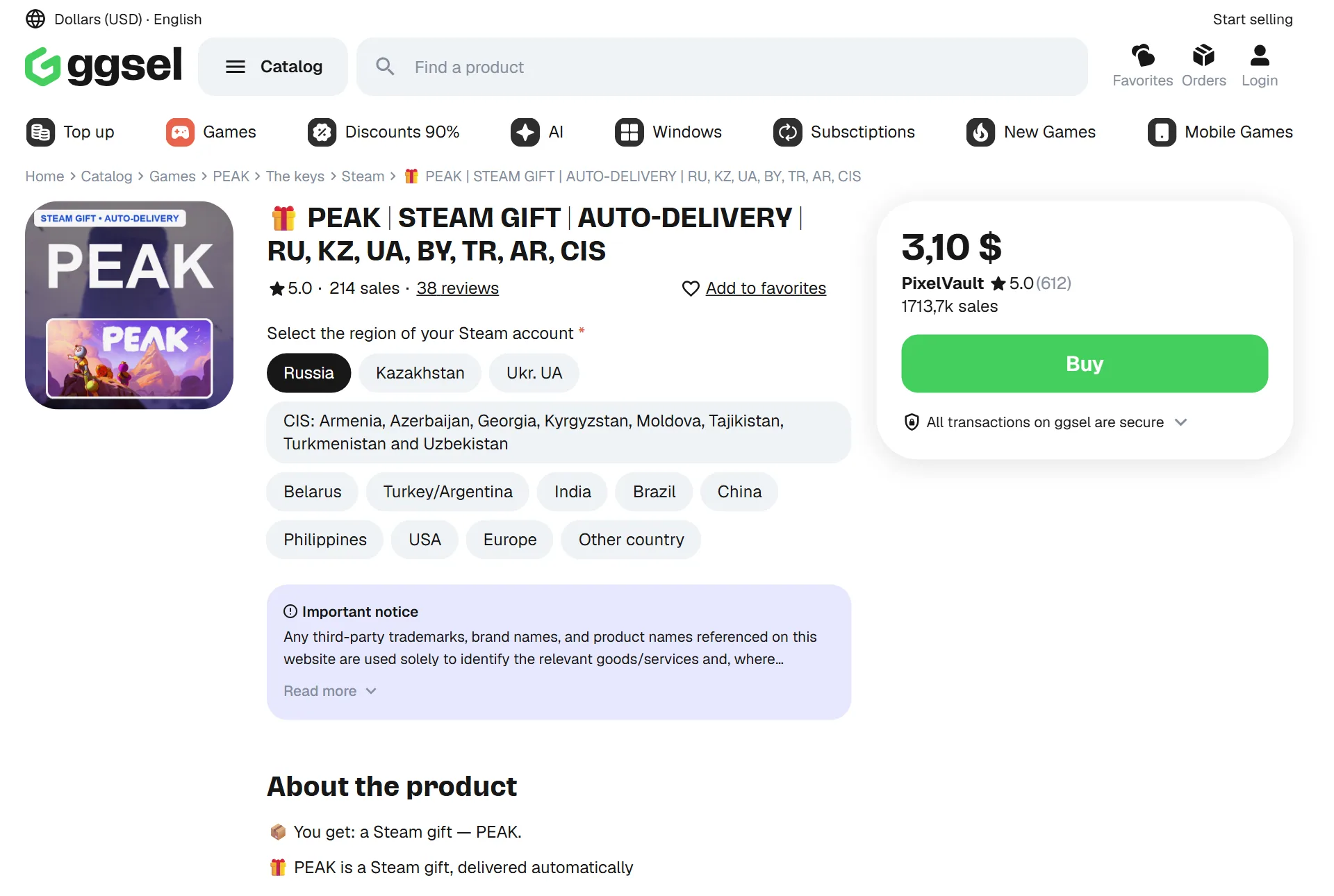
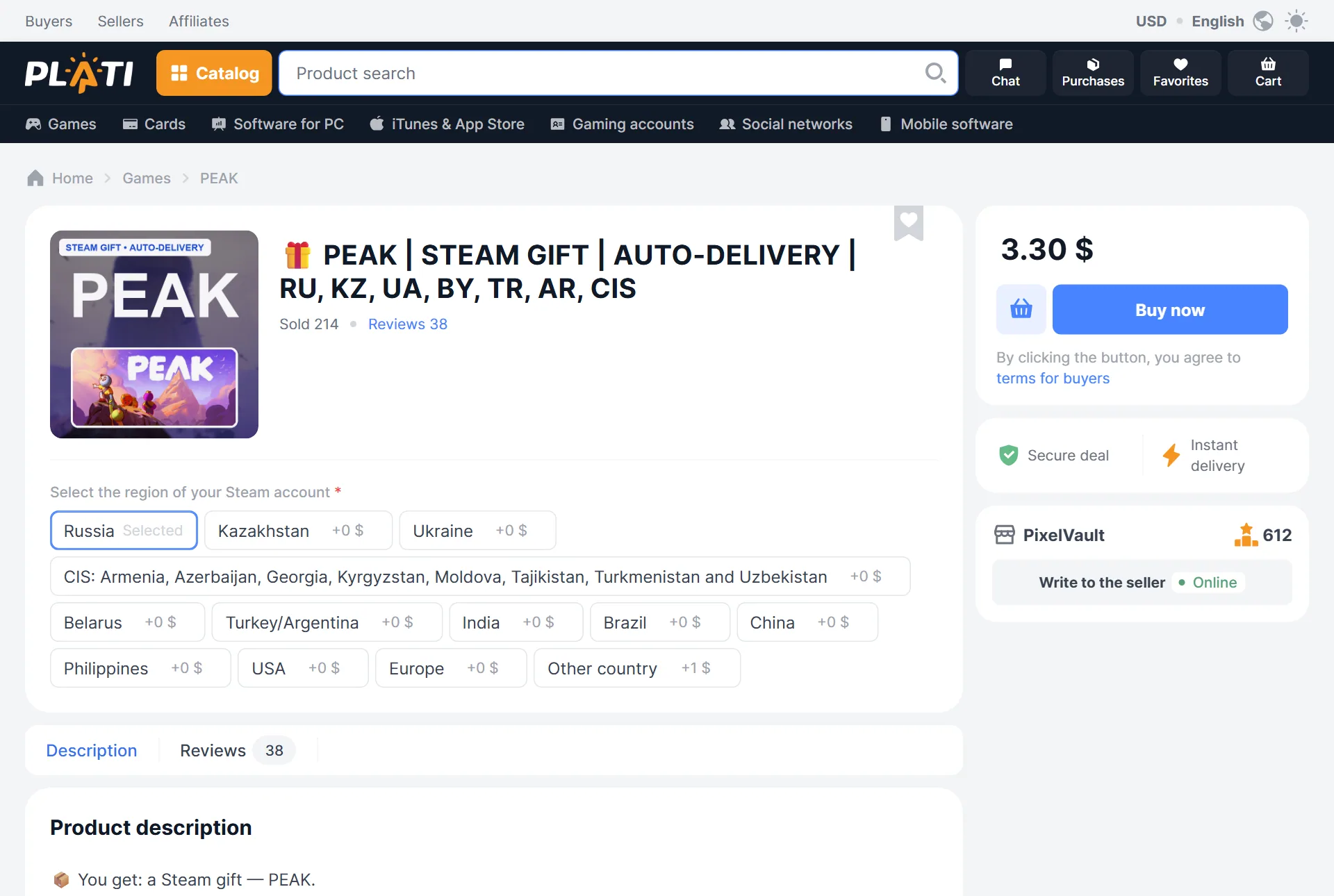
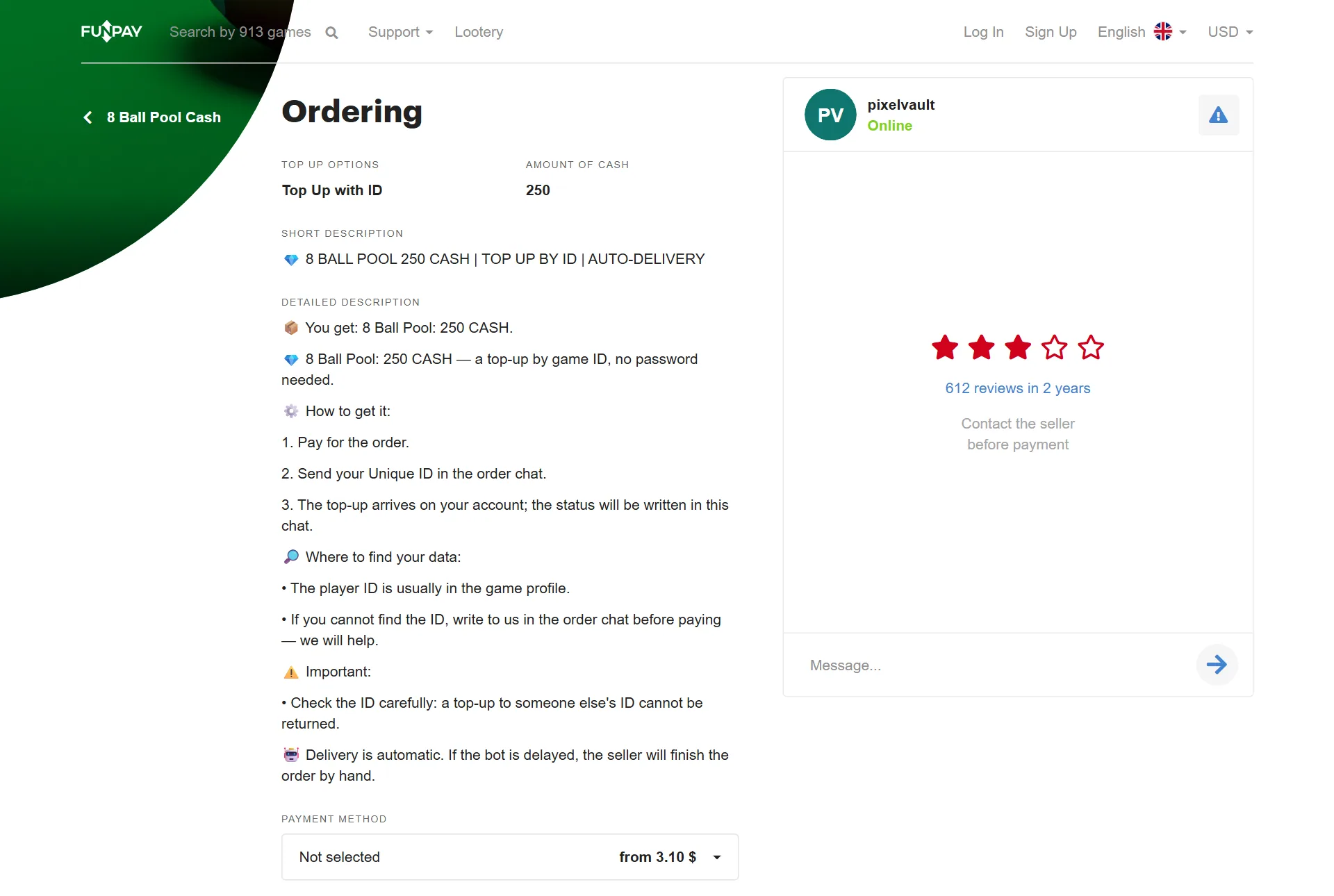
FunPay, GGSel and Plati are built differently: sections, moderation, holds and limits. The panel runs all three by their rules and shows you one list of listings, orders and chats. The listings that are already on the marketplaces it pulls in by itself when you connect.

FunPay without raising by hand

It connects with the golden_key from your browser. FunPay's sections with their fields are right in the “New listing” wizard: a game is searched for just as on the site, and a section is picked with one press.

  1. Raising on a timerFunPay allows raising a category about once every 4 hours. The panel raises it as soon as it is allowed, each game on its own timer.
  2. Auto-delivery by FunPay's rulesA goods line longer than 140 characters will not pass, and the panel warns you before sending. A listing from stock does not switch off after its first sale.
  3. Unconfirmed ordersThe buyer forgot to confirm receipt: once a day the panel can ask FunPay support itself. You switch it on in the rules.

Go through the wizard in the demoAuto-delivery on FunPay

Your keys, accounts and services: the panel delivers from your own stock by itself, and the rest by hand in the order chat. All in one table and under one subscription.

02How it works

You connect the marketplaces. After that the panel works by itself

One order from connecting to delivery, in the real panel on demo data. The frames show the panel in Russian for now.

01

All your shops in one panel

Every marketplace has its own key. The panel checks it before saving and shows all your shops on one screen.

panel.your-shop.com

Open the demo panelNo time to look closely?the demo panel is a link away

03Features

Everything for a shop in one panel

The panel keeps the shop in order, and you come to see the result and to decide what only you can decide.

01 · Orders

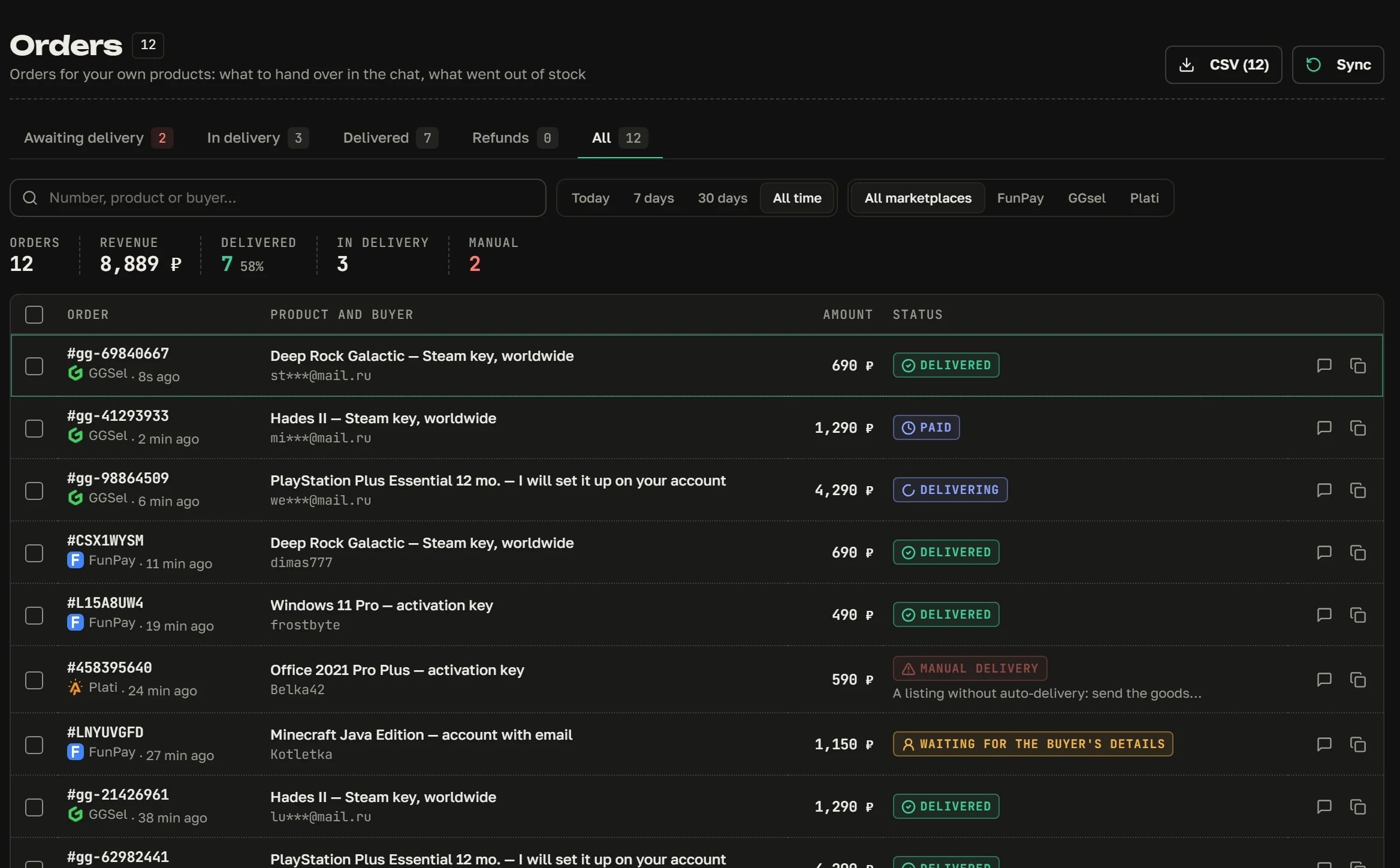
Orders are delivered by themselves

The buyer paid, the panel took a key from its own stock and sent it to the order chat. Stock is empty or a manual delivery is needed: the order goes to “Need attention” and a message reaches you on Telegram.

  • Orders from all marketplaces in one list
  • Repeat a delivery or refund from the order card
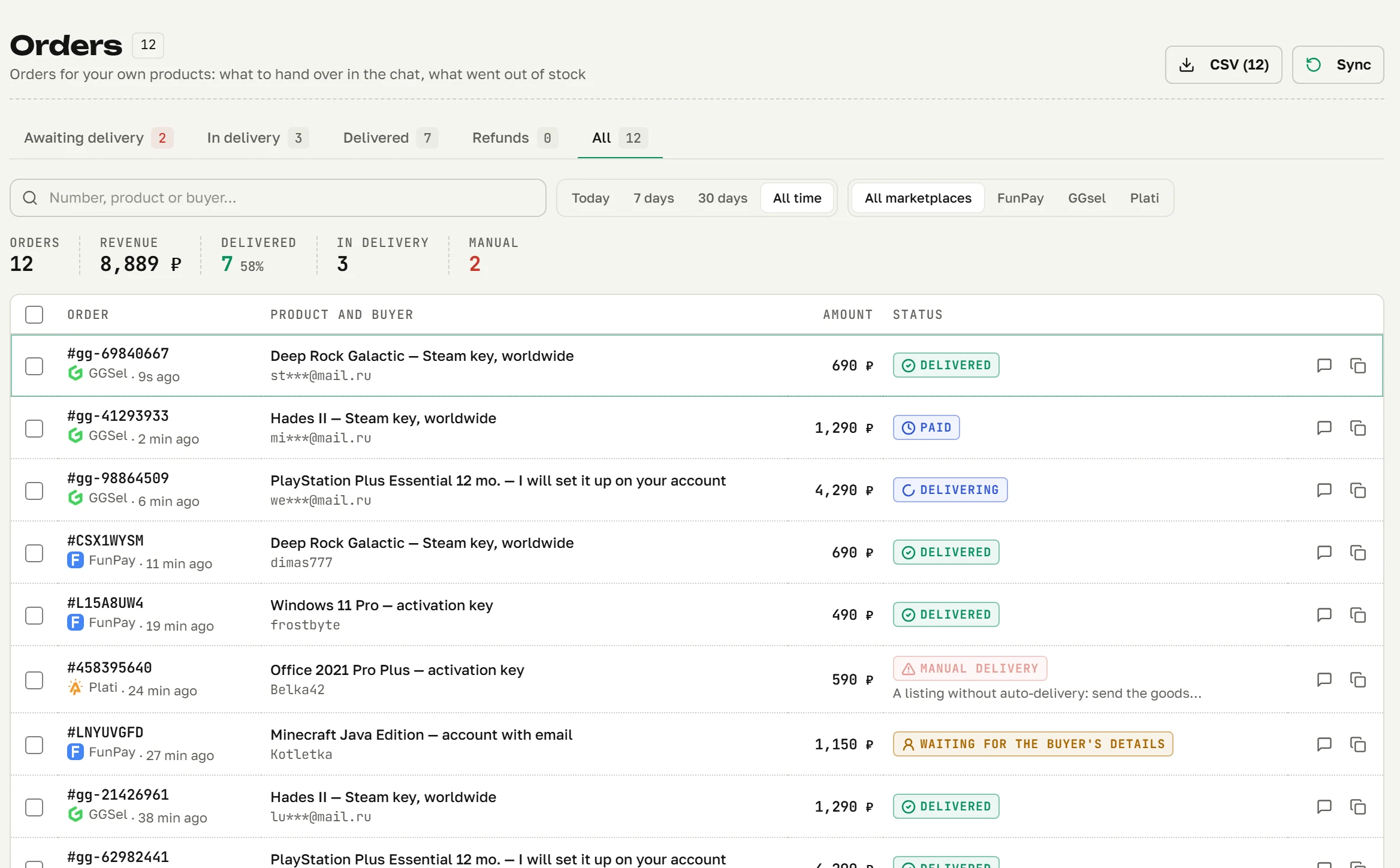
panel.your-shop.com/own/orders
“My products → Orders”: FunPay, GGSel and Plati orders with their delivery statuses“My products → Orders”: FunPay, GGSel and Plati orders with their delivery statuses

02 · Chat

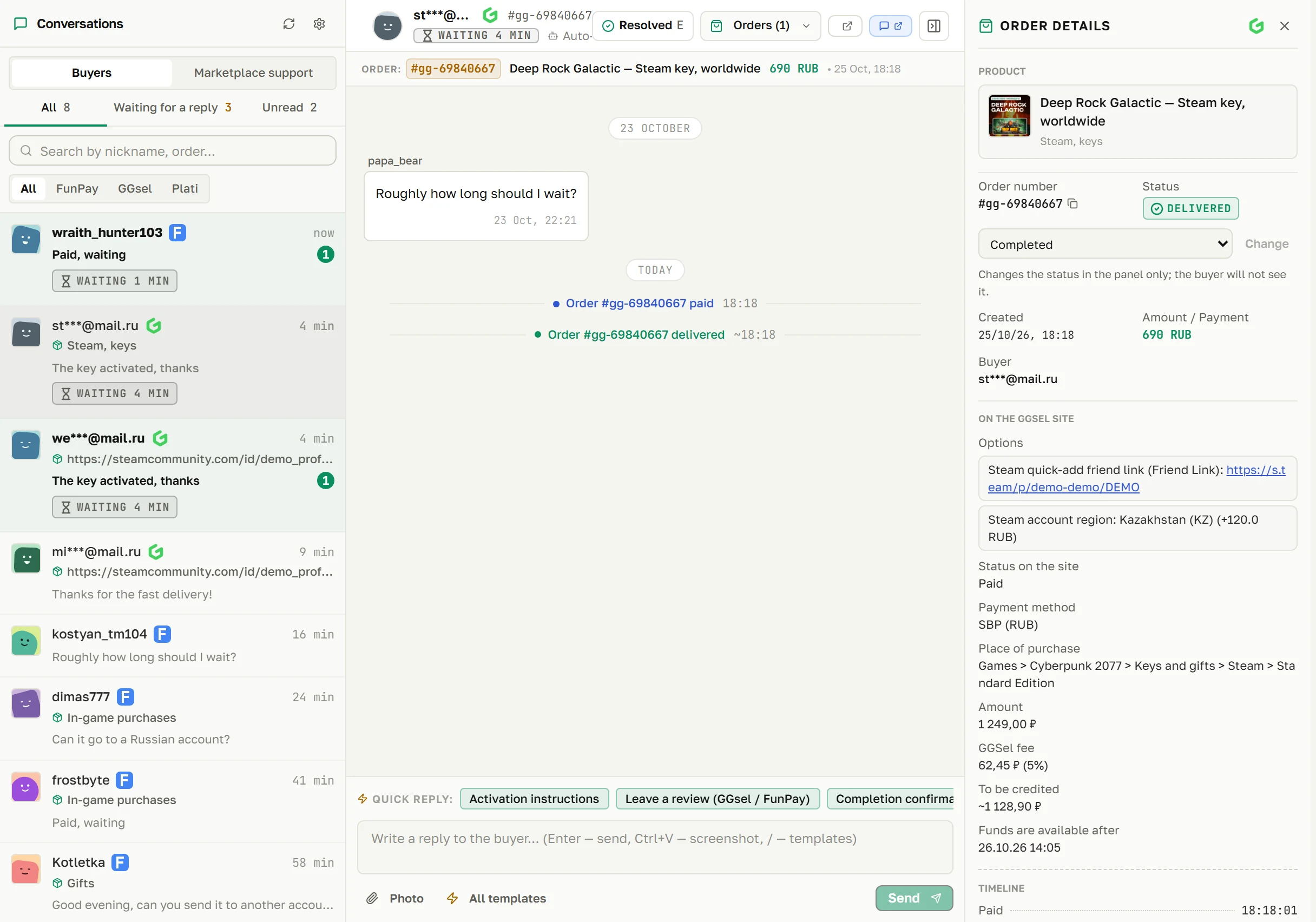
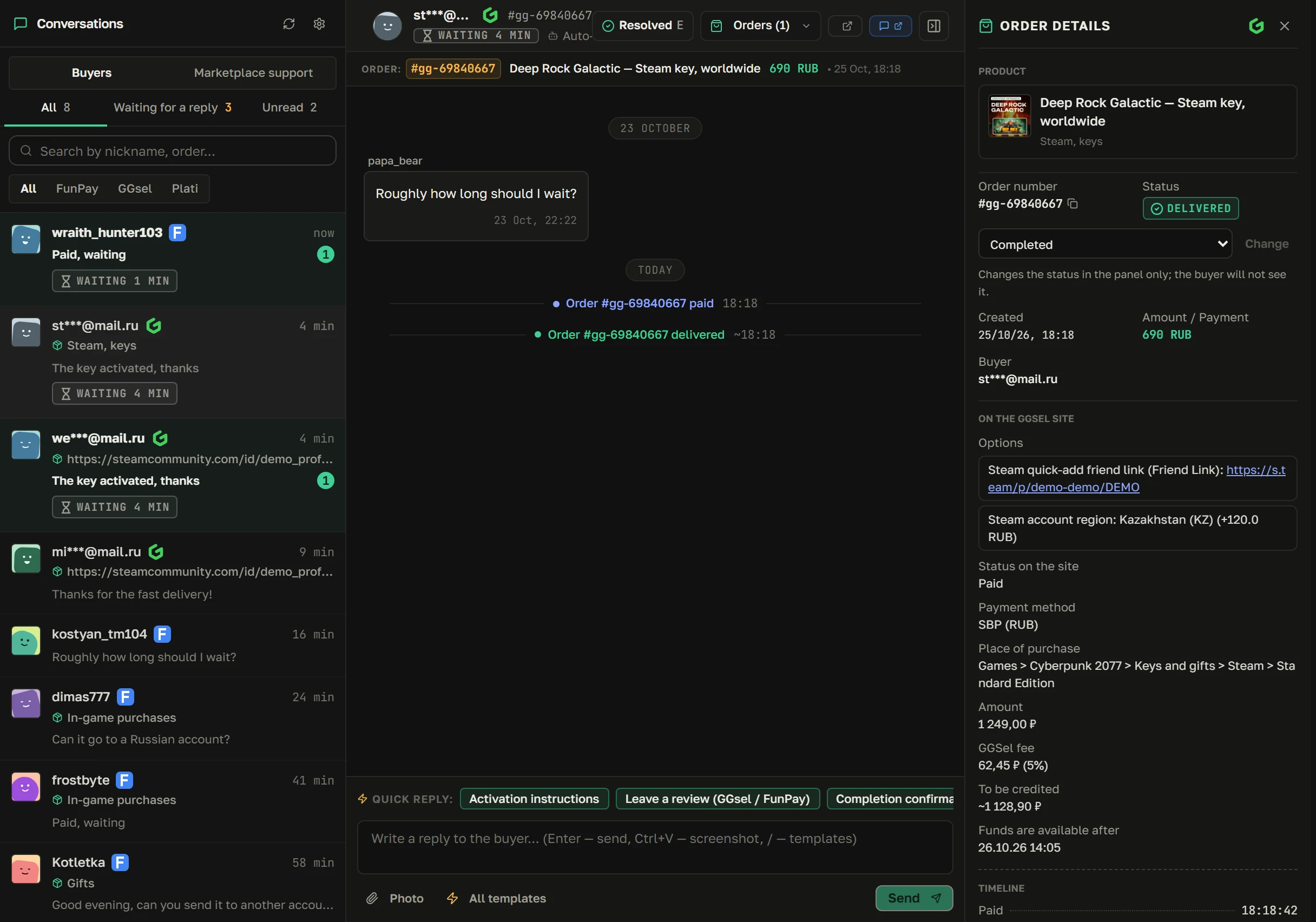
One chat for all marketplaces

Messages from all marketplaces in one window, with that buyer's order and the reply time beside them. The panel writes the instructions after payment by itself, answers frequent questions and reminds the buyer if they forgot to send the details.

  • You see who has been waiting how long
  • Reply templates and auto-replies
panel.your-shop.com/chat
The “Chat” section: dialogs from all marketplaces, the conversation and the order detailsThe “Chat” section: dialogs from all marketplaces, the conversation and the order details

03 · Listings

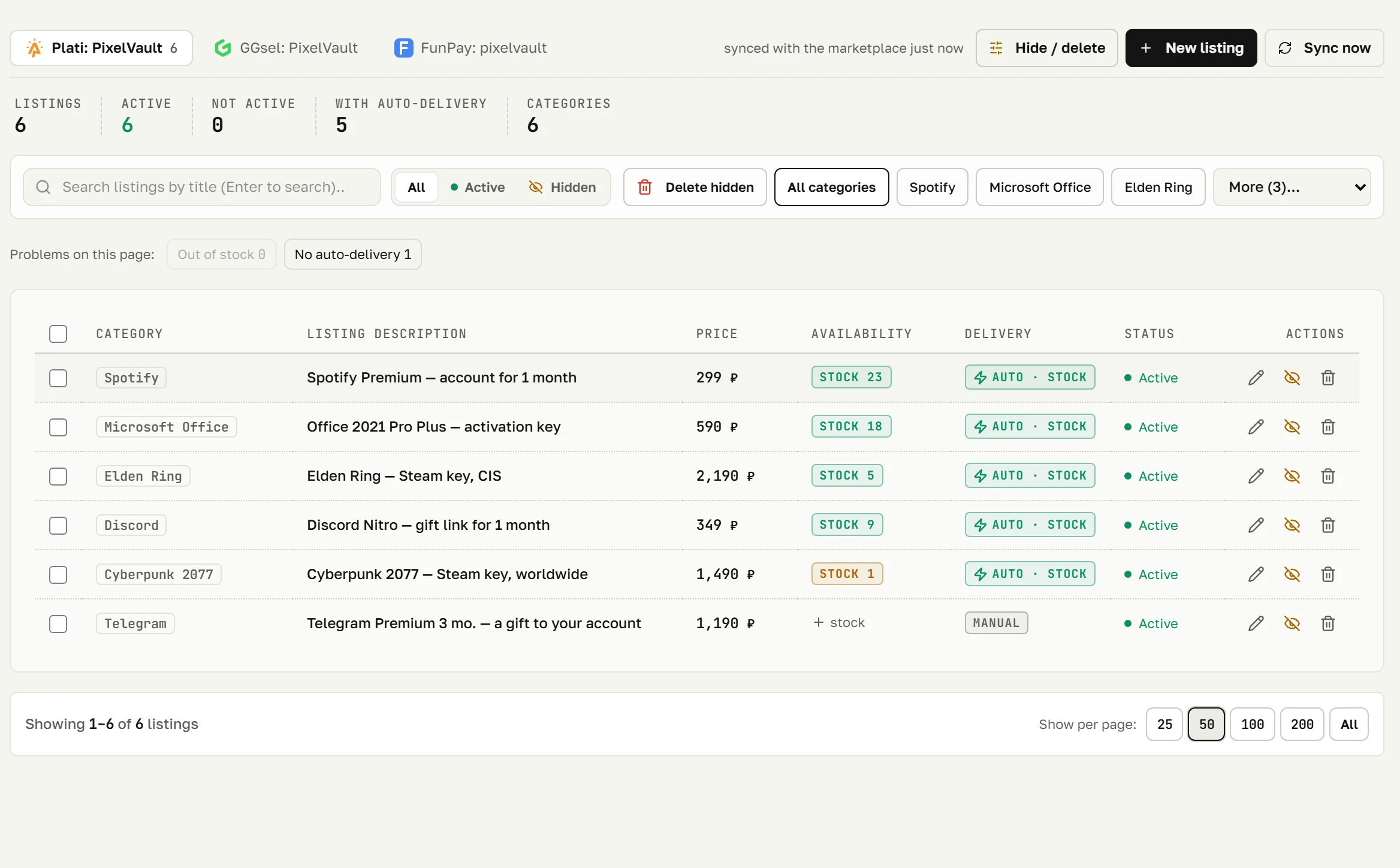
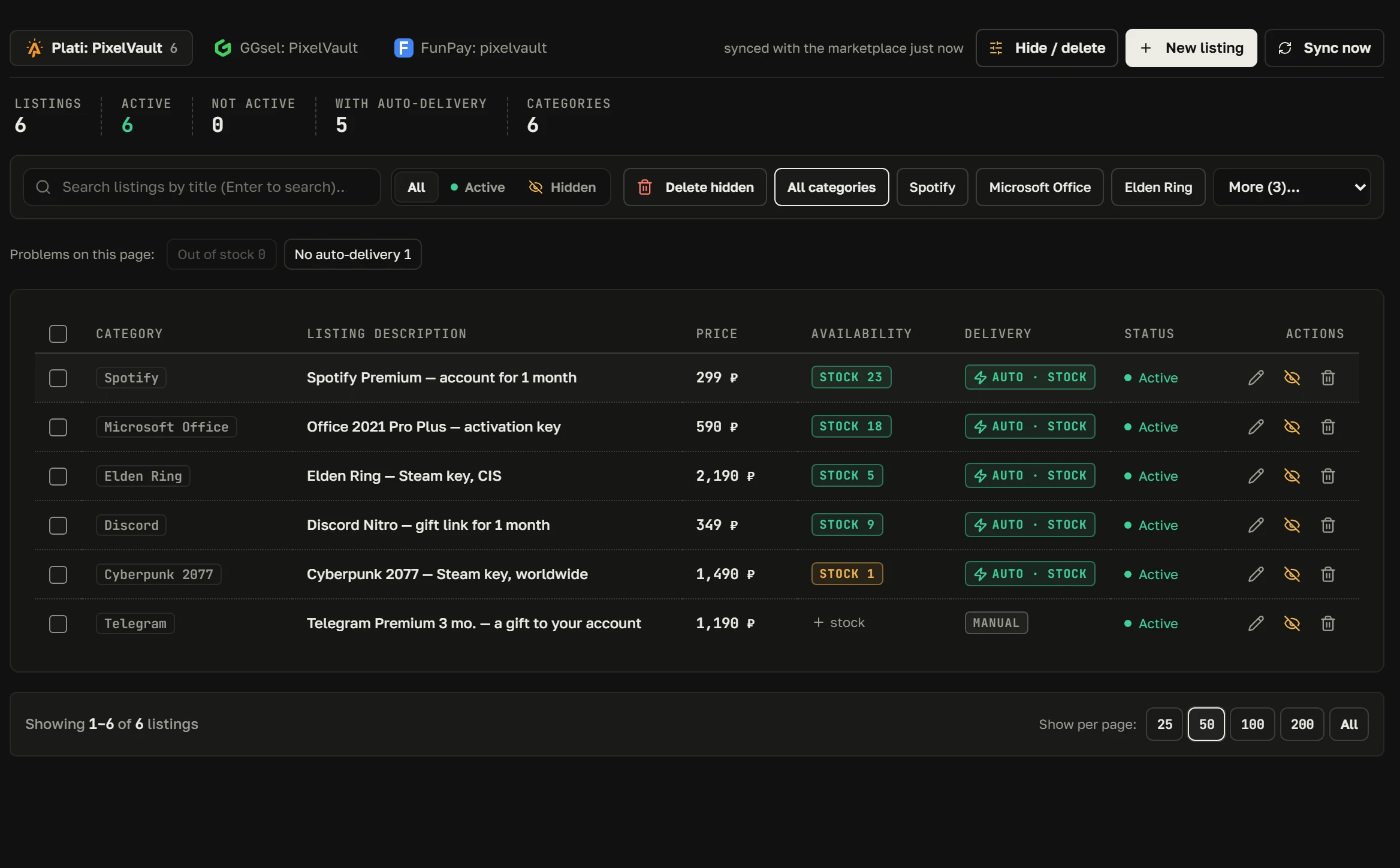
Listings of all marketplaces in one table

The price, the delivery and the status of every FunPay, GGSel and Plati listing. Change a price, switch a listing on or off, refill the stock: right from the table, without visiting the sites. FunPay listings are raised by themselves.

  • The “Delivery” column says honestly what will go out by itself
  • A new listing step by step for every marketplace
panel.your-shop.com/own/lots
“My products → Listings”: the price, delivery and status of every listing“My products → Listings”: the price, delivery and status of every listing

04 · Market

Where the demand is and what advertising costs

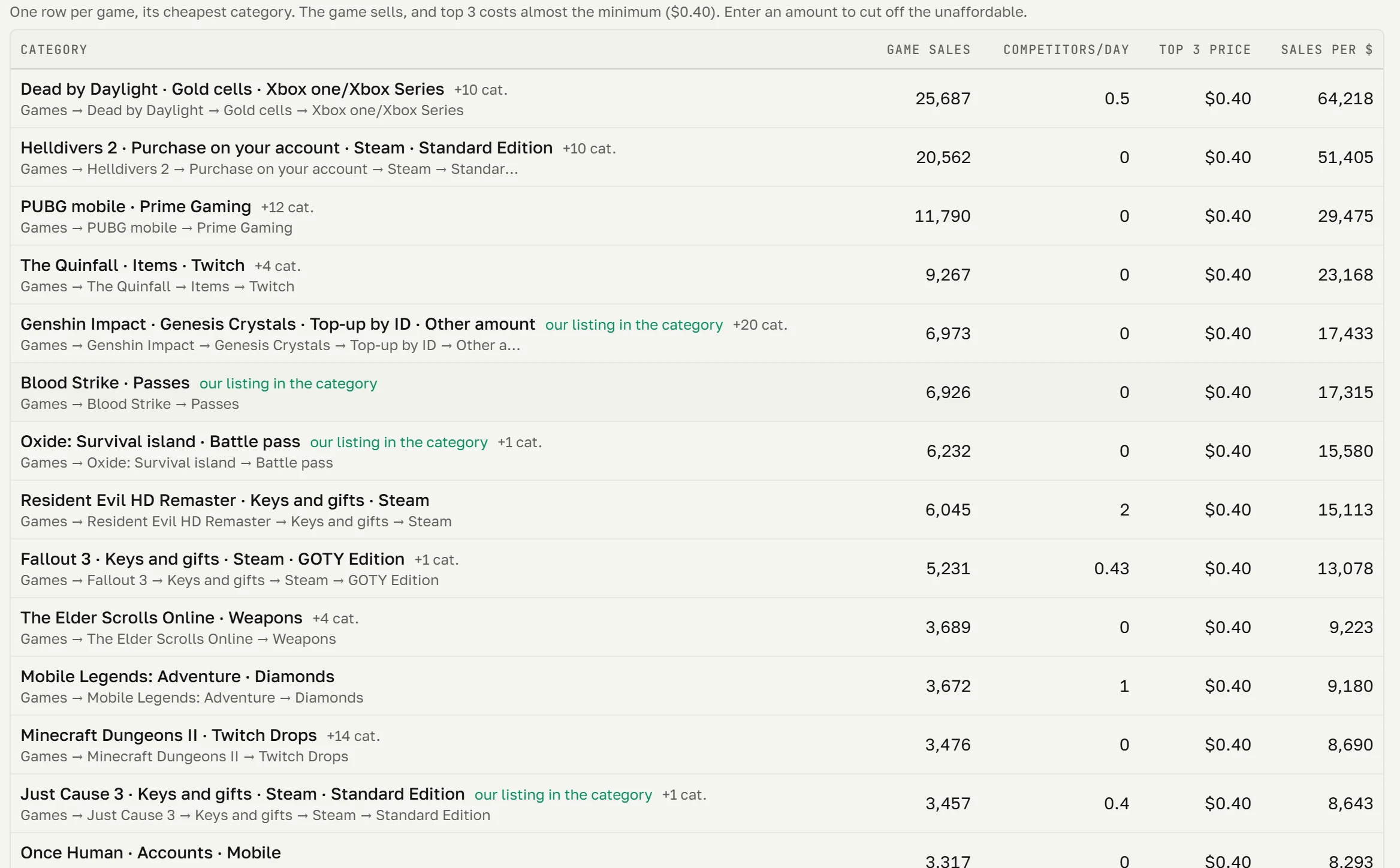
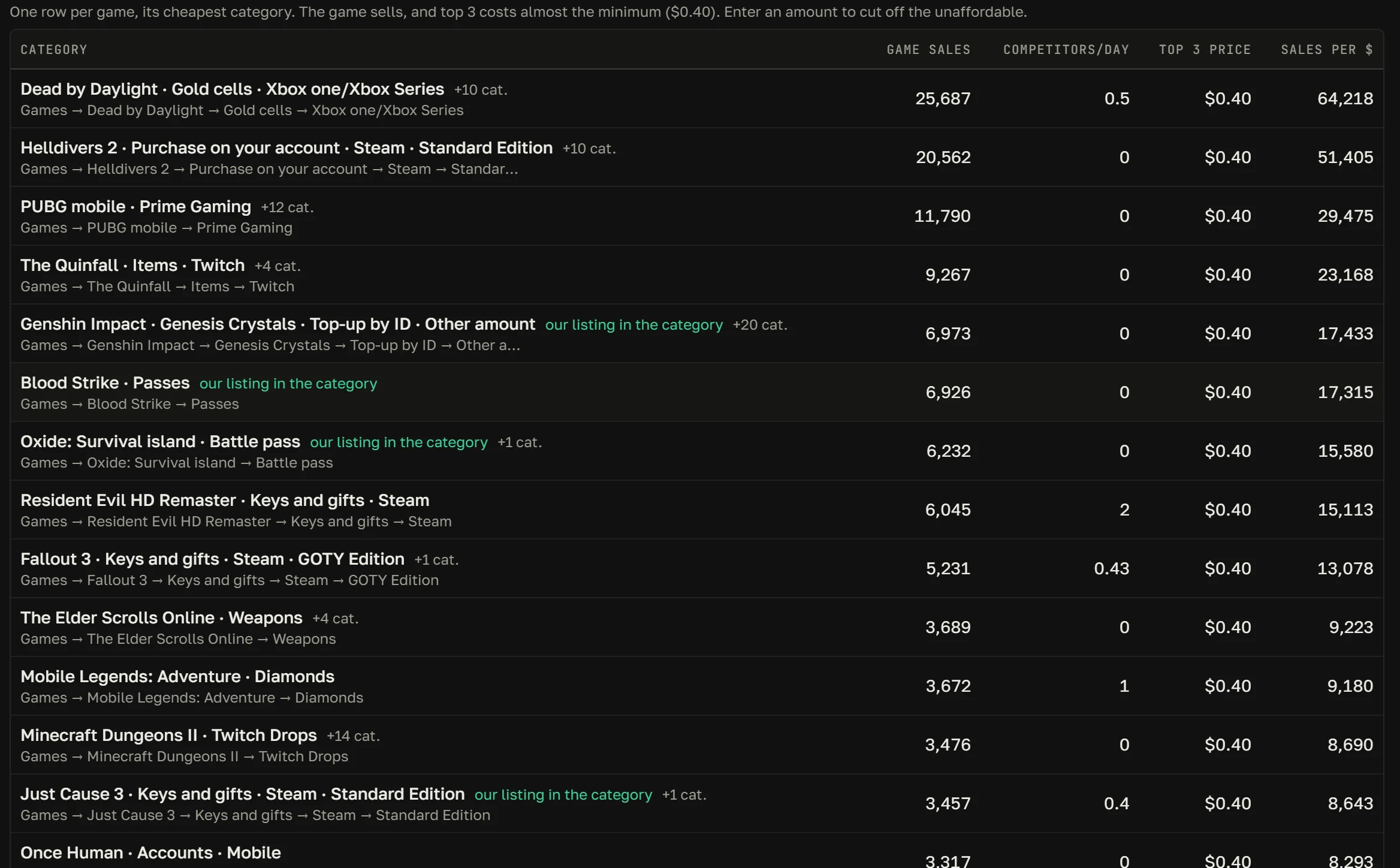
GGSel's picks of the day: categories with demand and the price of a placement in them. Advertising bids by category and next to your products, ready-made packs and sales statistics by game.

  • Bids for any period, not only GGSel's 11 days
  • The decision on advertising is always yours
panel.your-shop.com/tools/ggsel/market
“GGSel Market”: picks of the day, demand by category and the price of a placement“GGSel Market”: picks of the day, demand by category and the price of a placement

05 · Finance

Money from all marketplaces on one screen

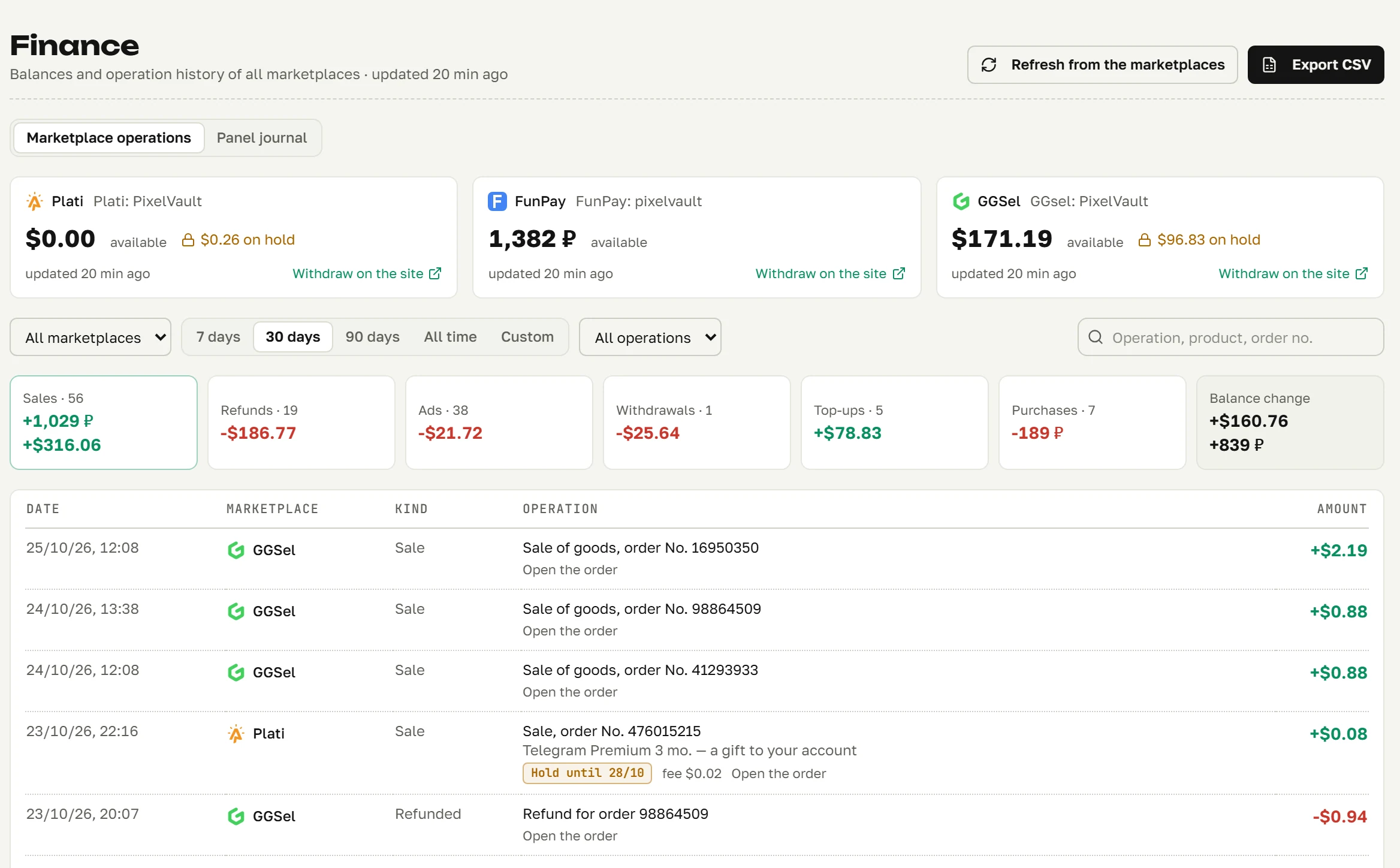
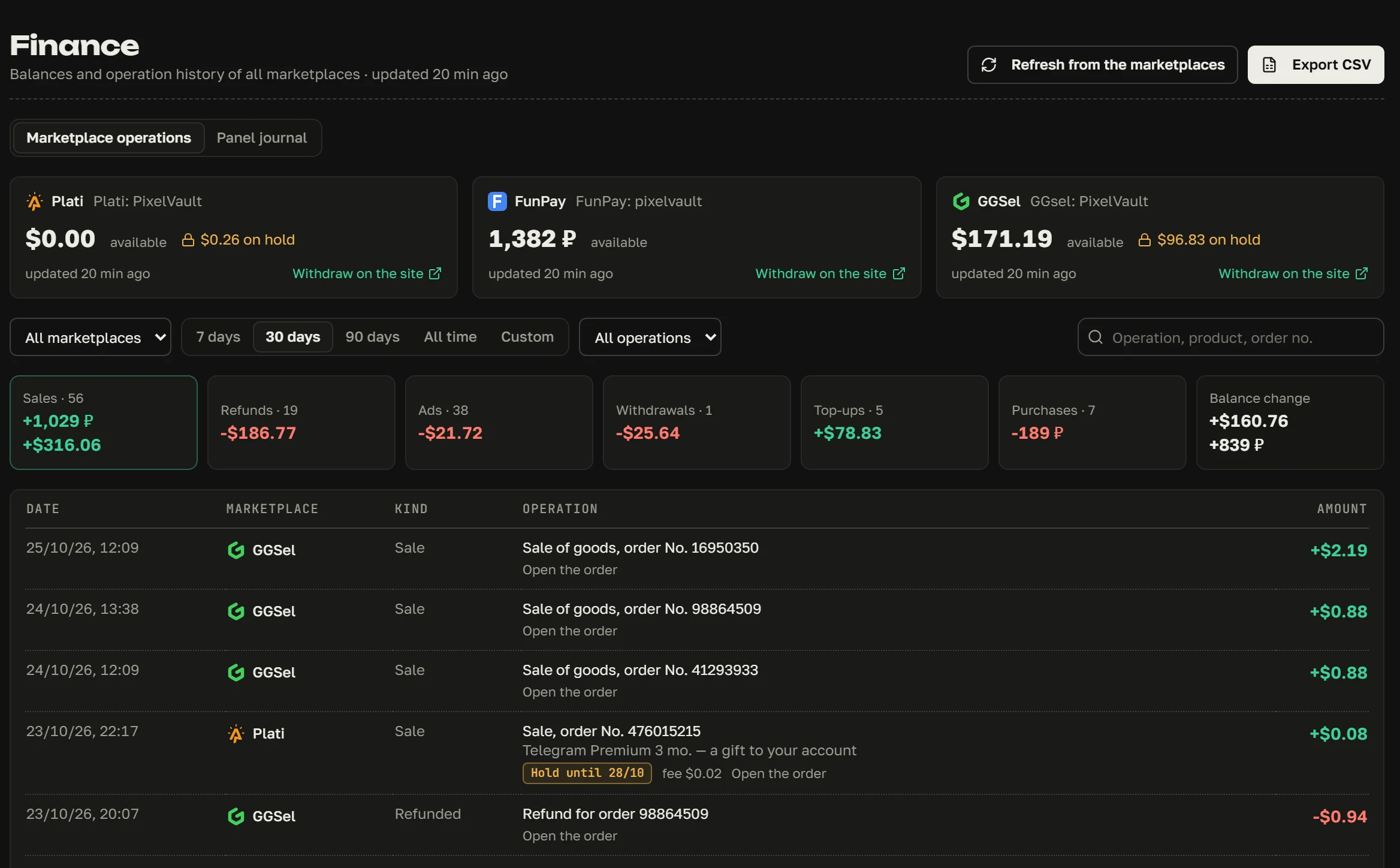
Balances and frozen sums on every marketplace, the history of operations and totals for sales, refunds, advertising and withdrawals. An export to CSV for your bookkeeping.

  • Reconciled to the kopeck with the marketplaces' sites
  • The GGSel hold by date: when and how much is released
panel.your-shop.com/finance
The “Finance” section: marketplace balances, totals and the history of operationsThe “Finance” section: marketplace balances, totals and the history of operations
Reviews

Reviews from all marketplaces and replies to them right from the panel.

Refunds

A full or partial refund right from the order card.

Auto-responder

Answers frequent questions and reminds buyers to send the details for their order.

Health center

Tells in plain words what broke and why.

Your own stock

Keys, accounts and links: every line is sold once, and the remainder is always visible.

Two-step sign-in

A code from an app and 8 backup codes in case you lose your phone.

Backups

Every night the panel saves a copy of the database and the settings.

Telegram bot

Orders, buyers' messages and failures go to your Telegram.

Updates

A marketplace changed something? The update installs with one button.

04While you are away

The night shift: the shop works while you sleep

Background tasks run on your server round the clock. Here is an ordinary night of the demo shop, line by line. In the morning you see the result.

  • Order delivery

    Takes a key from stock and sends it to the buyer in the order chat.

  • Replies to buyers

    Instructions right after payment, answers to frequent questions, reminders.

  • Reviews

    Collects reviews from all marketplaces. A bad review goes straight to Telegram.

  • Stock

    Keys ran out: the order waits for a manual delivery, you get a message on Telegram, and the buyer is told they were not forgotten.

  • Raising on FunPay

    Raises listings as soon as FunPay allows, on each game's timer.

  • The watchman and Telegram

    Every 2 minutes checks that everything is syncing. If it stopped, it writes to Telegram.

NIGHT SHIFTshop PixelVault · 00:00–08:00
  1. Deep Rock Galactic paid for on GGSelthe key from stock sent in 6 s
  2. The instructions went to the buyer2 s after payment
  3. Plati, a new review “Everything arrived, thanks”5 out of 5, in the “Reviews” section
  4. FunPay allowed raising18 categories raised
  5. FunPay · Kotletka: “Where do I enter the key?”replied from a template in 3 s
  6. Chats had not updated for 4 minutesa message to Telegram; working again at 04:22
  7. Hades II stock is empty, an order on FunPaywaits for you, the buyer is told
  8. Spotify Premium on Platia code from stock delivered in 4 s
Orders delivered7
Revenue for the night3,412 ₽
Replies to buyers9
Waiting for you in the morning1 order
Your actions0
Without youshift closed

05Money

The automation does not deliver at random

If there is nothing to deliver or an order looks doubtful, the panel stops, moves it to manual delivery and calls you. The buyer meanwhile knows they were not forgotten.

ORDER #KX7Q2MLAFunPay · Hades II, Steam key
The buyer paid990 ₽
Keys in stock0
Delivered by mistake0
05:15:02paid 05:15:03stock is empty: auto-delivery stopped 05:15:03the order is in “Need attention” 05:15:04you get a message on Telegram 05:15:05to the buyer: “we will deliver by hand”
Manual deliverybuyer informed
  • A key goes out once

    Every stock line is sold to one buyer. An order that is already being delivered is not delivered a second time.

  • Old orders are left alone

    When a shop with a history is connected, the panel does not deliver or forward the orders paid for before it.

  • Blacklist

    Orders of blacklisted buyers are not delivered automatically, only after your decision.

  • You find out first

    An order the panel did not deliver itself lands in “Need attention” and on Telegram. The buyer gets a message that they were not forgotten.

  • A refund with a calculation

    Before a refund the panel shows the sum the marketplace calculated and asks you to confirm with a tick.

The balances of all marketplaces on one screen

What is available and on hold at each marketplace is on one screen, checked against the marketplaces' sites. The panel does not withdraw money itself: the “To account” button opens the withdrawal on the marketplace's site, with its own confirmation.

06Security

The panel runs on your own server

Every customer gets their own panel on their own VPS. The marketplaces' passwords, keys and cookies do not come to us: they are stored on your side in encrypted form. No server? The panel can also be installed on your own Windows computer: how that differs.

Your keys stay with you

The access to the marketplaces lies only on your server.

What we see

Only the state of the panel: whether it works, which version, whether there are errors. Turnover only if you allow it yourself.

A server of your choice

A cheap VPS with 2 cores and 2 GB of memory and a disk of 10 GB or more will do. Installation is one command.

Copies every night

If something breaks, the panel goes back to yesterday's state in a couple of minutes.

07How to start

Four steps to your first sale from the panel

  1. 01

    Get a subscription

    By card or SBP, in USDT through Crypto Bot, or from a Lolz balance. The subscription key appears on the payment page as soon as the payment goes through.

  2. 02

    Install the panel

    Take a VPS and run the installation with one command, or install the program on a Windows computer. If it does not work out, support will help.

  3. 03

    Connect the marketplaces

    Enter the subscription key and the marketplaces' access. Your listings pull in by themselves, the new ones come from the “New listing” wizard.

  4. 04

    Work from the panel

    Orders, chats, listings and money of all three marketplaces are in one window.

08Pricing

One subscription, no tiers

Everything for working with the marketplaces is in one subscription: all marketplaces and any number of accounts. The subscription does not renew by itself: you pay when you need to. Prices are in rubles.

SELLERISTsubscription · calculation
Main subscription499 ₽
Total for 30 days499 ₽
499 ₽a month599 ₽

First customers' price
For the first 20 customers: 499 ₽ a month for good, as long as the subscription is renewed on time (no later than 3 days after the term ends). Places left: 20.

Subscribe

What is included

  • FunPay, GGSel and Platiany number of accounts
  • The “New listing” wizardyour own stock, auto-delivery, refunds
  • A shared chatauto-replies and a Telegram bot
  • Raising listingsand GGSel advertising
  • Market, finance, reviewsand the hold calendar
  • Updates and supporton Telegram; new marketplaces come within the same subscription

How to pay

01Pay your way

By card or SBP (lava.top), in USDT through Crypto Bot, or from a Lolz balance.

02It does not renew by itself

The panel reminds you three days before the term ends. Nothing is charged behind your back.

03The longer, the cheaper

3 months: a 10 % discount. A year: 30 %.

04Renew on time, pay less

A renewal discount of 5 %, 10 %, then 15 %. It stays as long as you keep renewing.

Do not need the panel, only the statistics? The “Extension and statistics” subscription is 299 ₽ a month: the Chrome extension, the full tables of the market and the GGSel advertising bids (both in Russian).

Buy

09Bonus days

Subscription days for friends and ideas

How an invitation is counted and what the friend gets is on the bonus days page (in Russian).

+7daysInvite a seller

A friend subscribes through your link: they get a discount on the first payment, and a week later you get 7 days. The link and the invitation statistics are in the panel and on the site by the subscription key.

My invitations (in Russian)
+3days or moreSuggest an idea

What does the panel lack? Write to us. If we take the idea into work, we add days to your subscription.

Suggest an idea (in Russian)
24hoursTry it for free

Give your name, and the key with the installer is on the page at once. The hours run from the panel's first launch, not from the moment you get the key.

Get a trial day

10The first subscription

Get a subscription

Say what to call you and how to reach you. Next is the payment page, where you choose the term and the payment method. We show the subscription key right after payment.

Want to ask first? Write on Telegram: we will answer your questions and take the payment there too. The panel's news and market notes are in the channel (in Russian).

Already subscribed? Renew, or press “Pay” in the panel: “Settings → Subscription”.

A subscription for 1 month · 499 ₽

Crypto BotUSDTLolzfrom balanceCardlava.topSBPlava.top

11Questions

Frequently asked questions

What is Sellerist?

A service for sellers of digital goods on the FunPay, GGSel and Plati marketplaces. It gathers orders, chats, listings and money from all marketplaces into one panel and takes over the routine: delivering orders, answering frequent questions, prices, raising listings. Access is by subscription.

Why a server of my own?

So that the access to your marketplaces is only yours. The panel is installed on your VPS and turns to us only to check the subscription and download updates. A cheap server with 2 cores and 2 GB of memory and a disk of 10 GB or more running Ubuntu or Debian will do.

I do not know much about servers. Will I manage?

Installation is one command: the script sets everything up and shows the address, the login and the password. If you get stuck, write to support and we will help.

Can it run on my own computer, without a server?

Yes, on a computer with Windows 10 or 11: a double click on the installer, no administrator rights needed, the same subscription. While the computer is off or asleep, orders are not delivered, so for round-the-clock sales a server is better. A detailed comparison, and the installation instructions.

Can I sell my own keys and accounts?

Yes, that is the main scenario. Upload them to the panel's stock, and after payment it sends the buyer the next line by itself. Services and made-to-order goods are delivered by hand in the order chat, and the orders of all marketplaces are in one list.

Can I try it before paying?

Yes. Take a trial day: the key and the Windows installer appear on the page at once. The 24 hours count from the panel's first launch. And at the top of this page there is a demo: it is the real panel.

Does the subscription renew by itself?

No. We do not store payment details and charge nothing. The panel reminds you three days before the term ends, and you renew with the “Pay” button in settings.

What happens if I do not renew?

The panel shows the payment screen. For three more days the shop works as usual, then the background tasks (delivery, prices, raising) stop. Your data stays on your server, and after payment everything starts again.

What if a marketplace changes something?

We release an update. The panel shows “Update available”, the “Update” button installs it by itself and checks that everything started.

Can I get my money back?

Yes. The terms are on the “Refunds and cancellation” page.

How do I contact support?

On Telegram. From the panel, with the “Report a problem” button in the header.

Three marketplaces in one shop

The orders, chats and listings of FunPay, GGSel and Plati are now in one panel.

Subscribe